


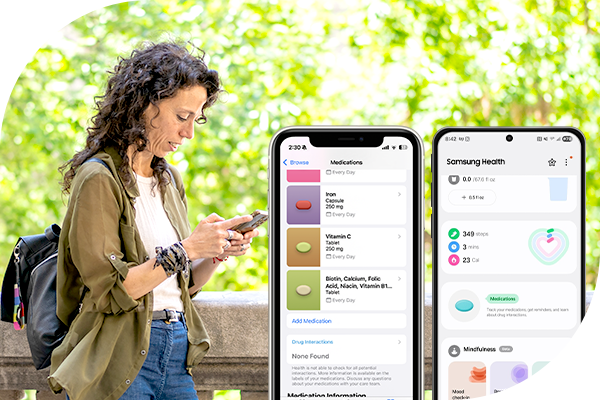
Ever miss a dose and wondered, Did I take that already? You’re not alone. Taking medication every day can be hard, especially if you take many medications or have a chronic condition.
The good news is that simple tools can help. Many people use smartphones or other reminders to stay on track. Some tools even let a caregiver help, which can add peace of mind.
Why Medication Reminders Matter
Taking medication as prescribed is essential for managing your health and avoiding issues. Since many people already use smartphones, tablets, or other devices every day, digital reminders are an easy way to build a routine and stay consistent.
Common Challenges and How to Handle Them
Many people face barriers when taking medication. Here are a few common ones:
- Forgetting doses: Use reminders, alarms, or a pill organizer
- Side effects or cost concerns: Talk with your provider about other options or assistance programs
- Refills and prescriptions: Set refill reminders, sign up for CVS Caremark® Mail Service Pharmacy for eligible drugs, or ask your pharmacy for help
- Cultural or personal concerns: Look for support that respects your background and needs, including mental health coaching if helpful
Set Up Medication Reminders on Your Smartphone
Most medication apps follow the same basic steps. Below are simple guides for common options.
-
Apple Health
(iPhone Users) -
Samsung Health
(Android Users) -
Google Fit and Other Medication Apps
(Android Users)
Apple Health (iPhone Users)
Use the Health app on your iPhone to set medication and other health reminders.
-
Open the Health App on your iPhone and tap the search icon.
-
Find Medications under Health Categories, tap Medications.
-
Add your medication: Start your list or add new meds. You can search by name or take a photo of the label.
-
Enter details: Choose the type, strength, shape, and color if needed.
-
Set your schedule: Pick the time and how often you take it.
-
Finish setup: Select additional drug interactions and tap Done.
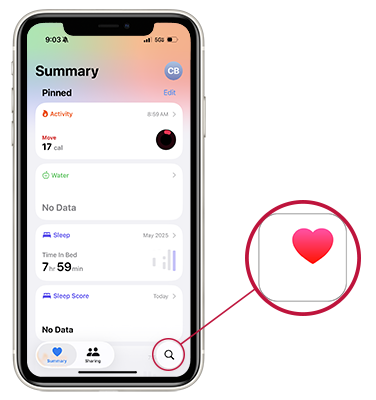
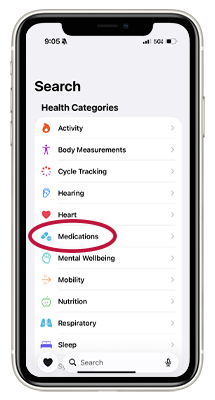
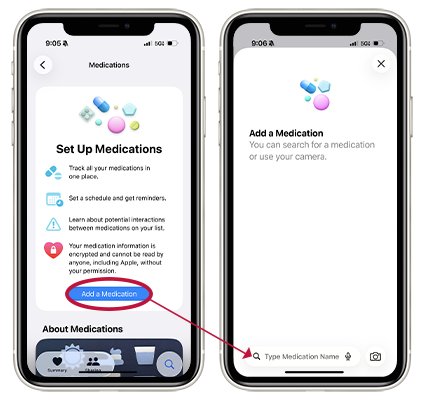
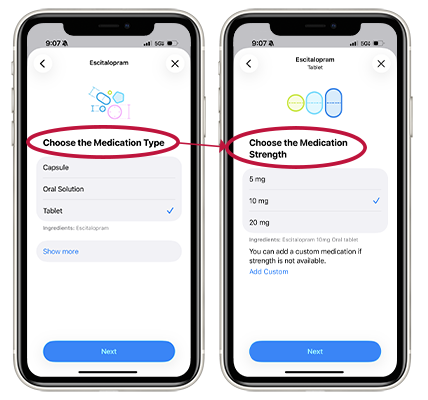
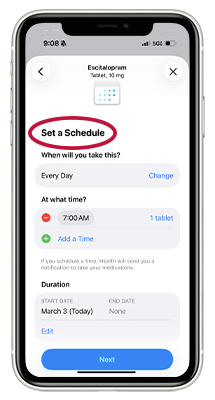
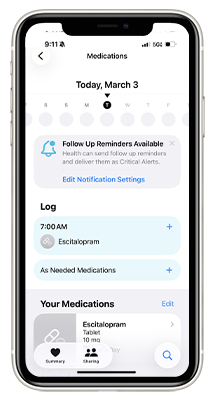
Apple Health also lets you share your medication list with a caregiver. This can help loved ones support you or help in an emergency.
Samsung Health (Android Users)
Samsung Health also offers medication and other health reminders.
- Open the Health App and sign in to your Samsung account.
- Add medications to the Medications section.
- Enter details such as dosage, timing, and how often you take it.
- Add any drug allergies and select drug interactions.
-
Save your schedule and review it on the home screen.
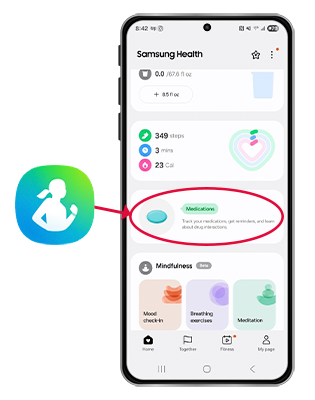
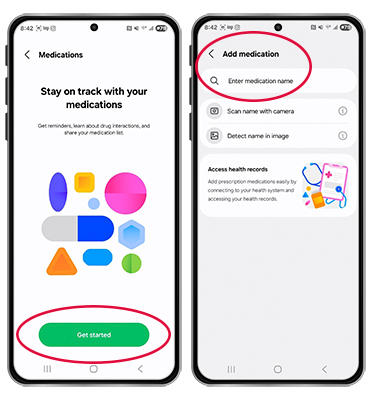
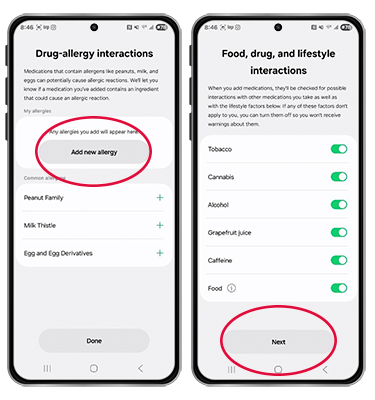
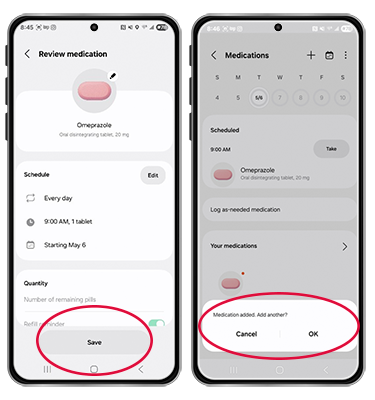
Samsung Health can share information with family members and connect to wearable devices for updates.
Google Fit and Other Medication Apps (Android Users)
Google Fit works best when paired with a medication app.
- Download Google Fit and a medication app like Medisafe or MyTherapy
- Connect the apps so your health information stays in one place
- Set reminders in the medication app; you can log doses and invite a caregiver to help keep track of your routine
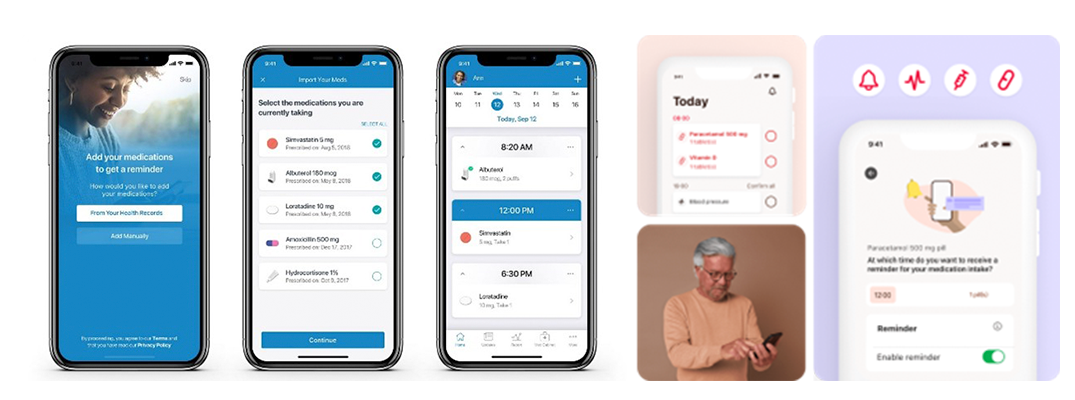
Google Fit stores your health data, while the medication app handles reminders and tracking.
No Smartphone? No Problem!
You can manage medications without a smartphone. These options work well for many people:
Pill Organizers: Use weekly boxes to see what you’ve taken; some include built-in alarms
Paper Planners: Write down your schedule and check off each dose.
Alarm Clocks or Watches: Set alarms for medication times.
Caregiver Support: Ask someone you trust to help with reminders or check-ins.
Taking Medications with Meals: Take your medicine with meals if it is safe to do so. This helps you remember to take it at the same time every day. Ask your pharmacist if you are not sure if your medicine is okay with food.
Final Thoughts
There is no one “right” way to manage medications. The best system is the one you will use every day. Whether you choose an app, a pill box, or help from a caregiver, small steps can make a big difference.
Choose one method today and try it for a week. Building a simple routine is a strong step toward better health.
Apple and the Apple logo are trademarks of Apple Inc. Samsung and Samsung Health are trademarks of Samsung Electronics Co., Ltd. Google and Google Fit are trademarks of Google LLC. All other trademarks are the property of their respective owners.