Find a Doctor
Use Gia or our Find a Doctor Tool to search for in-person and virtual BH providers. When searching, use the Doctors by Specialty or Places by Type search options.
Get Started with Gia for Virtual Behavioral Health Services
First, download the Gia by MVP Mobile app from the App Store® or Google Play®. Then sign into Gia® or create an account. To create an account, you must be an MVP Member and you need an email address where you can receive messages.
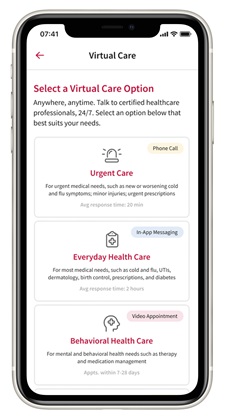
To access urgent or emergency care services through UCM, select Virtual Care, then Urgent Care, then Start Your Visit.
To access virtual primary care services through Galileo, select Virtual Care, then Everyday Health Care, then Talk to a Galileo Doctor. You will be prompted to create a free profile with Galileo and download the Galileo app from the App Store® or Google Play®.
To access behavioral health services through myVisitNow, select Virtual Care, then Behavioral Health Care, then Start with myVisitNow. You will be prompted to create a free profile with myVisitNow and download the myVisitNow app from the App Store® or Google Play®.
Note: Your Galileo profile, your myVisitNow profile, and your Gia profile are all separate accounts. However, when you sign in to Gia and choose either Everyday Health Care or Behavioral Health Care, you will be automatically signed into your Galileo or myVisitNow account, respectively.